How to Format a Novel Manuscript: Standard Manuscript Format
How to format a novel manuscript in standard manuscript format: font, spacing, margins, header, title page and chapters, with Word and Google Docs steps.
To format a novel manuscript, use standard manuscript format: 12-point Times New Roman, double spacing, 1-inch margins, a half-inch first-line indent and a ragged right edge. Add a title page with your contact details and a rounded word count, put a "Surname / Title / page" header on every page of text, and start each chapter on a new page.
That is the whole of it, and every agent, editor and publisher who asks for "standard manuscript format" means roughly that. The details below are where writers get stuck: what goes on the title page, how to number pages so the title page doesn't count, and what to do when two guides tell you different things. There are step-by-step instructions for Word and Google Docs, and our own count of how many pages real novels fill in this format.
Key takeaways
- The core rules fit on one line: Times New Roman 12 pt, double-spaced, 1-inch margins, half-inch indents, left-aligned, black text, one space after a full stop.
- A novel gets its own title page: contact details top left, an approximate word count top right, and the title and byline centred about a third of the way down.
- Every page of text carries a header: surname, a keyword from the title and the page number, top right. Numbering starts at 1 on the first page of the story, not the title page.
- An 80,000-word novel is about 230 to 290 pages in this format. We laid out four public-domain novels to measure it, and the old "250 words a page" rule overstates the page count.
- The recipient's guidelines win. Where they say nothing, pick one convention from the table below and use it consistently.
What is standard manuscript format?
Standard manuscript format is the plain, double-spaced layout that agents, editors and publishers expect when you submit fiction. It isn't what your finished book will look like. It's a working document, set up so it's easy to read on screen, mark up and estimate.
There's no official body behind it. The closest thing to a reference is William Shunn's "Proper Manuscript Format", which writers have used since the 1990s and which most other guides follow. Publishers' own guidelines sit on top of it: if an agency's page asks for a different font or no header, do what it says.
What are the standard manuscript format rules?
Twelve-point Times New Roman, double spacing, 1-inch margins and half-inch first-line indents, with a header and a title page. Here is the full set in one place.
| Element | Standard | Notes |
|---|---|---|
| Font | Times New Roman, 12 pt, black | Courier is the "classic" alternative |
| Line spacing | Double | Including dialogue; no extra blank line between paragraphs |
| Margins | 1 inch on all four sides | |
| Paragraphs | 0.5-inch first-line indent | Set it in paragraph settings, not with the Tab key |
| Alignment | Left, ragged right | Never justified |
| Spaces after a full stop | One | |
| Emphasis | Italics | Not underlining or bold |
| Paper | US Letter (US and Canada), A4 elsewhere | Follow the market you're submitting to |
| Header | Surname / Title keyword / page number, top right | On every page except the title page |
| Page numbers | Start at 1 on the first page of text | The title page isn't numbered |
| Chapters | Each starts on a new page, about a third of the way down | |
| Scene breaks | A centred # on its own line |
Some guides use * * * |
| The end | "THE END" centred after the last line | Some writers use # |
| File | .docx, unless asked otherwise | Name it something like Surname_Title.docx |
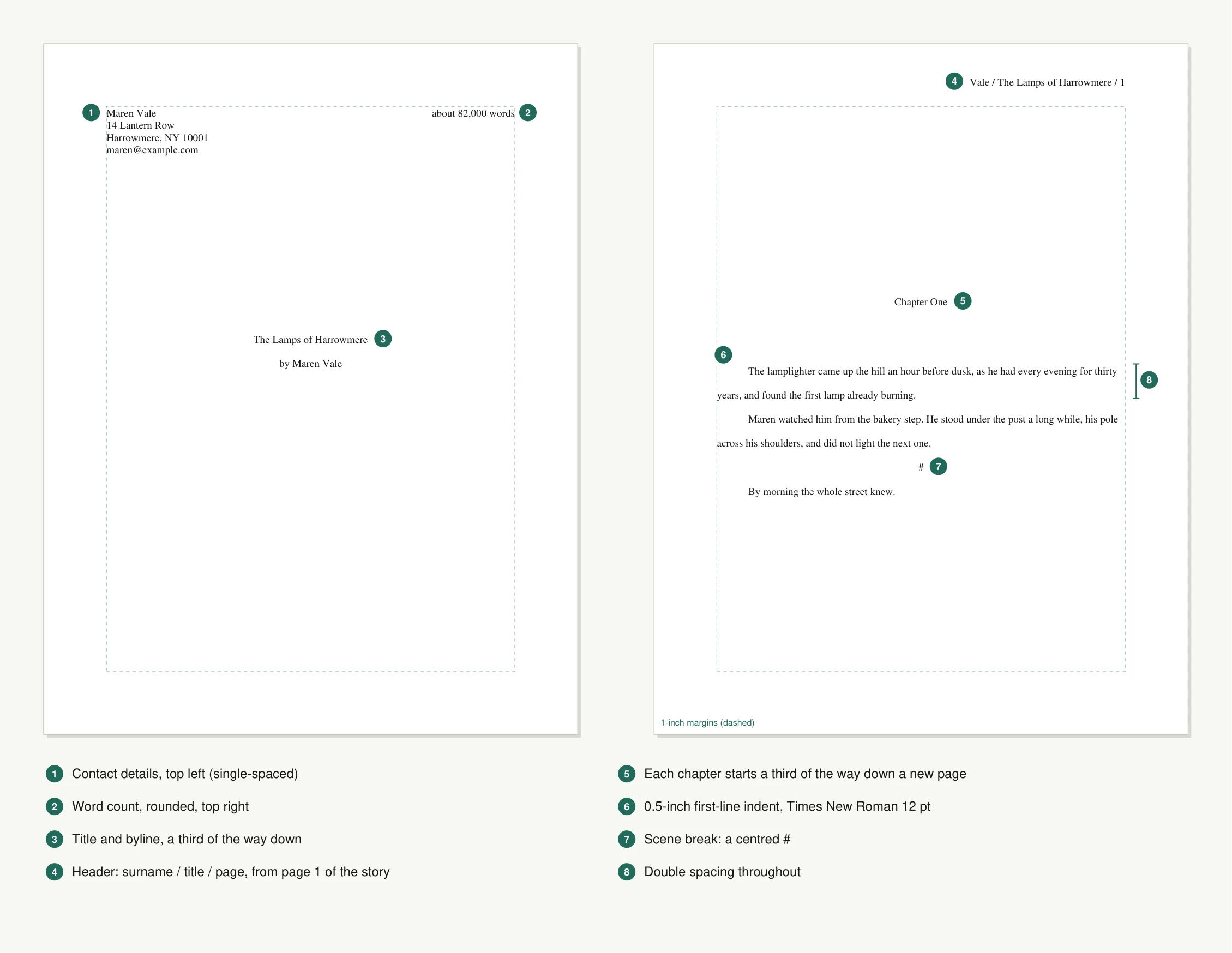
A title page and the first page of chapter one in standard manuscript format, drawn to scale (US Letter, 1-inch margins, Times 12 pt, double spacing).
How do you set up the title page?
Put your contact details in the top-left corner, an approximate word count in the top-right corner, and the title with "by" and your name centred a third to halfway down the page. Use the same 12-point font as the rest of the manuscript. There's no header and no page number on this page.
- Contact block (top left): your name, address, phone and email, single-spaced. If you have an agent, their details go here instead. Shunn's guide says you can include as little as a pen name and an email if sharing more would put you at risk, as long as the market's guidelines allow it.
- Word count (top right): written as "about 80,000 words". Use your word processor's count and round it (more on rounding below).
- Title and byline (centred): the title, then "by" and the name you want on the cover. That can be a pen name.
Leave out dedications, epigraphs and copyright notices. They belong to the finished book.
How do you format the header and page numbers?
Put your surname, a keyword from your title and the page number in the top-right corner of every page except the title page, like Vale / Harrowmere / 12. If a page gets separated from the pile, the header tells the reader which manuscript it came from and where it goes.
Numbering starts at 1 on the first page of the story. In Word that means hiding the number on the title page and starting the count at 0, which the steps below cover. Shorten a long title to one or two words.
How do you format chapters and scene breaks?
Start every chapter on a new page, with the chapter heading centred about a third of the way down, and mark scene breaks within a chapter with a centred #. The white space at the top of a chapter page is deliberate. It tells the reader a chapter starts here, even on a printout.
Use a real page break (Ctrl+Enter in Word and Google Docs) rather than pressing Enter until the page runs out. Blank lines shift as soon as you edit the chapter before, and the next chapter heading ends up halfway down a page. A blank line on its own isn't a scene break either: it vanishes at the bottom of a page, which is why the # exists.
How do you format a novel manuscript in Microsoft Word?
Set the font, spacing and indent on the Normal style, set 1-inch margins, then add a header with a page number that starts at 0 so the title page isn't counted. These steps are for Word in Microsoft 365 on Windows; the Mac menus are almost the same.
- Font and paragraphs. On the Home tab, right-click the Normal style and choose Modify. Set Times New Roman, 12 pt, black. Click Format › Paragraph and set alignment to Left, indentation Special: First line, 0.5", spacing Before 0 pt, After 0 pt, and line spacing Double. Setting this on the style, not on selected text, means new paragraphs follow it too.
- Margins and paper. On the Layout tab, choose Margins › Normal (1 inch all round), then Size › Letter, or A4 if you're submitting outside the US and Canada.
- Title page. Type the contact block and word count at the top of page one (put a right-aligned tab before the word count so it sits in the corner), then the title and byline lower down. Press Ctrl+Enter to start the story on page two.
- Header. Go to Insert › Header › Edit Header, align the text right, type
Surname / Title /and choose Insert › Page Number › Current Position › Plain Number. Tick Different First Page so the title page stays blank. - Start numbering at 1. Choose Insert › Page Number › Format Page Numbers and set Start at to 0. Microsoft's own help gives this trick: the hidden title page becomes page 0 and the first page of the story becomes page 1.
- Chapters. Put a page break (Ctrl+Enter) before each chapter heading, or select the heading style, open Paragraph › Line and Page Breaks and tick Page break before so every chapter does it automatically.
- Save as .docx and name the file with your surname and title.
How do you format a manuscript in Google Docs?
Use File › Page setup for margins and paper, Format menus for spacing and indents, and Insert › Page elements for the header and page numbers, then download the file as .docx. Headers and page numbers only work in pages format, not pageless.
- Page setup. Open File › Page setup. Make sure Pages (not Pageless) is selected, set the paper size to Letter or A4, and set all four margins to 1 inch.
- Font. Select all (Ctrl+A) and set Times New Roman, 12.
- Spacing. Choose Format › Line & paragraph spacing › Double, then Custom spacing and set the space before and after paragraphs to 0.
- Indent. Choose Format › Align & indent › Indentation options, set Special indent to First line and 0.5 inches.
- Header. Choose Insert › Page elements › Header, align it right, type
Surname / Title /and add the number with Insert › Page elements › Page number. Tick Different first page in the header options so the title page has no header. - Numbering from the first page of text. Google Docs counts the title page by default. Put a section break after the title page (Insert › Break › Section break (next page)), then open Insert › Page elements › Page number › More options, apply the numbering to the section after the title page and set it to start at 1.
- Chapters. Put a page break (Ctrl+Enter) before each chapter.
- Download with File › Download › Microsoft Word (.docx), which is the format agents expect.
Where do the manuscript format guides disagree?
On word-count rounding, the first paragraph's indent, scene-break marks, header style and paper size. None of these will sink a submission. Pick one option, use it all the way through, and let the recipient's guidelines overrule it.
| Question | One answer | The other answer | What we'd do |
|---|---|---|---|
| Rounding the word count | Nearest 100, or nearest 500 for long manuscripts (Shunn, Scribophile) | Nearest 1,000 (Reedsy) | Either is fine for a novel. "About 81,500 words" and "about 82,000 words" both say "this is a standard-length book" |
| Indent the first paragraph of a chapter? | Yes, like any other paragraph (Shunn) | No indent after a heading or scene break (Reedsy) | Indent it. In a manuscript the unindented opening is a typesetting choice, and the typesetter will make it |
| Scene-break mark | # |
* * * |
#, the traditional manuscript mark. Either is understood |
| Header style | Vale / Harrowmere / 12 |
VALE/HARROWMERE/12, title in capitals |
Either. The point is surname, keyword and number |
| Paper size | US Letter | A4 | Letter for US and Canadian markets, A4 for most others |
| Font | Times New Roman | Courier ("classic" format) | Times New Roman, unless the market asks for Courier |
How many pages is an 80,000-word novel?
An 80,000-word novel fills about 230 to 290 pages in standard manuscript format, depending on how much dialogue it has. We measured it: we laid out four public-domain novels with US Letter pages, 1-inch margins, Times 12 pt, Word's double spacing (23 lines a page), half-inch indents, a new page for each chapter starting a third of the way down, and a title page.
| Novel | Words | Manuscript pages | Words per page |
|---|---|---|---|
| The Great Gatsby | 48,143 | 173 | 278 |
| Pride and Prejudice | 120,734 | 417 | 290 |
| Frankenstein | 74,919 | 240 | 312 |
| Dracula | 160,996 | 464 | 347 |
The spread comes from the prose, not the format. Short paragraphs and lots of dialogue leave half-empty lines, so Gatsby gets fewer words on each page. Dracula's long diary entries pack the lines full. At 278 to 347 words a page, 80,000 words comes to between 231 and 288 pages. Word's own line breaking and widow control will move your exact figure by a few per cent. On A4, whose text area is a little narrower but taller, the same books ran about 5% shorter (Pride and Prejudice: 395 pages), so 80,000 words comes to roughly 220 to 270 A4 pages.
The old rule of 250 words a page would put the same novel at 320 pages. As Shunn explains, that rule came from typewriters, where every character took the same width and about 25 lines fit on a page. Proportional fonts fit more on a line, so the rule no longer works, and publishers now go by the computer's word count anyway. Quote words, not pages.
Is manuscript format the same as formatting a book for self-publishing?
No. Manuscript format is for sending your book to an agent, editor or publisher; formatting for self-publishing means designing the book's interior. A self-published paperback uses a trim size such as 6 × 9 inches, justified text, single spacing, a book font and running heads, and an ebook needs a reflowable file. You can still keep your working draft in manuscript format and produce the print and ebook versions from it at the end.
Can NovelCanon export a manuscript in standard format?
Yes. NovelCanon's Word export produces a .docx file already in standard manuscript format, on the Manuscript and Pro plans. We make NovelCanon, and we built the export to follow the rules in the table above, so you can go from draft to submission file without retyping your settings.
From your project's overview, click Export, then Word document, and download the file when it's ready (if you leave, we email you the link). The file has:
- Times New Roman 12 pt in black, double spacing, half-inch first-line indents, a ragged right edge and 1-inch margins, on US Letter if your browser is set to the US, Canada or another Letter country and on A4 everywhere else, the same way Word and Google Docs choose;
- a title page with your name (from your account) in the top-left corner, the word count rounded the way Shunn's guide rounds it in the top-right corner, and the title with "by" and your name a third of the way down;
- a
Surname / Title / pageheader on every page of text, numbered from 1 on the first page of the story, and none on the title page; - each chapter on a new page, a third of the way down, with a centred
#between scenes and "THE END" after the last line.
What you add yourself: the rest of your contact block under your name (address, phone, email), a pen name if you use one, the other paper size if you're submitting to a market abroad (A4 for UK, Australian and most other agents; Letter for US and Canadian ones), and a shorter keyword in the header if your title is long. On the Free plan, the export covers Markdown and plain text, which you'd format with the Word or Google Docs steps above. The plans page has the full comparison.
Before you send it, it's worth running one more check. A clean layout won't save a manuscript where a character's eyes change colour between chapters, and a full-manuscript continuity check catches that kind of slip before an agent does. If your draft lives in Scrivener today, you can import the project directly and export it from NovelCanon in this format. And if you're still choosing where to write the next book, our guide to the best book writing software compares the options.
Sources: William Shunn, A Brief Manuscript Formatting Checklist, the sample novel manuscript and The Old Rule of Thumb for Estimating Word Count Is Obsolete and Proper Paper Size for Manuscript Submissions; Microsoft Support, Start page numbering later in your document; Google Workspace Updates, Add different page numbers to different sections in Google Docs; SFWA, Nebula Rules. Novel texts from Project Gutenberg. Checked 10 November 2026.
Frequently asked questions
Is a 50,000-word book a novel?
Yes, by the most common definition. The Science Fiction and Fantasy Writers Association counts anything of 40,000 words or more as a novel for the Nebula Awards, and 50,000 words is the target of NaNoWriMo-style writing challenges. Agents often expect more in most adult genres, so check what novels in your genre usually run before you submit a short one.
What is the best format for writing a novel?
Write in whatever layout keeps you writing, and convert at the end. Standard manuscript format is a submission format: it matters when an agent, editor or publisher opens the file. When you send it, use a .docx file with 12-point Times New Roman, double spacing, 1-inch margins and half-inch indents, unless the recipient's guidelines ask for something else.
Should a novel manuscript be justified?
No. Standard manuscript format is left-aligned with a ragged right edge. Full justification stretches the spaces between words to make both edges straight, which makes the spacing uneven and harder to edit. Justified text belongs in the finished, typeset book, not in the manuscript you submit.
Do you put one space or two after a period in a manuscript?
One. Two spaces after a full stop was a typewriter habit, and current guides, including William Shunn's widely used format guide, say to use a single space. If your draft has double spaces, use find and replace to swap two spaces for one before you submit.
Can I use Courier instead of Times New Roman?
Yes, if you like it or the market asks for it. Shunn's guide comes in two versions: the modern one uses Times New Roman and the classic one uses Courier, and some magazines ask for the Courier version by name. Times New Roman is the safer default. Whichever you choose, use 12 point and keep it consistent throughout.
Should I put my real name and address on the title page?
Most agents and big publishers expect your legal name and contact details, because a sale means contracts and tax forms. If sharing them would make you unsafe, Shunn's guide says you can put as much or as little as you like in the contact block, including a pen name and just an email, as long as the submission guidelines don't say otherwise.
Written by
Munib Ali Laghari
Founder, NovelCanon
Munib founded NovelCanon to give novelists a writing studio that keeps every character, world rule and plot thread consistent across the whole book.
About NovelCanonGet the next post by email